


Why Did My Gembet Crypto Deposit Fail? 4 Common Errors
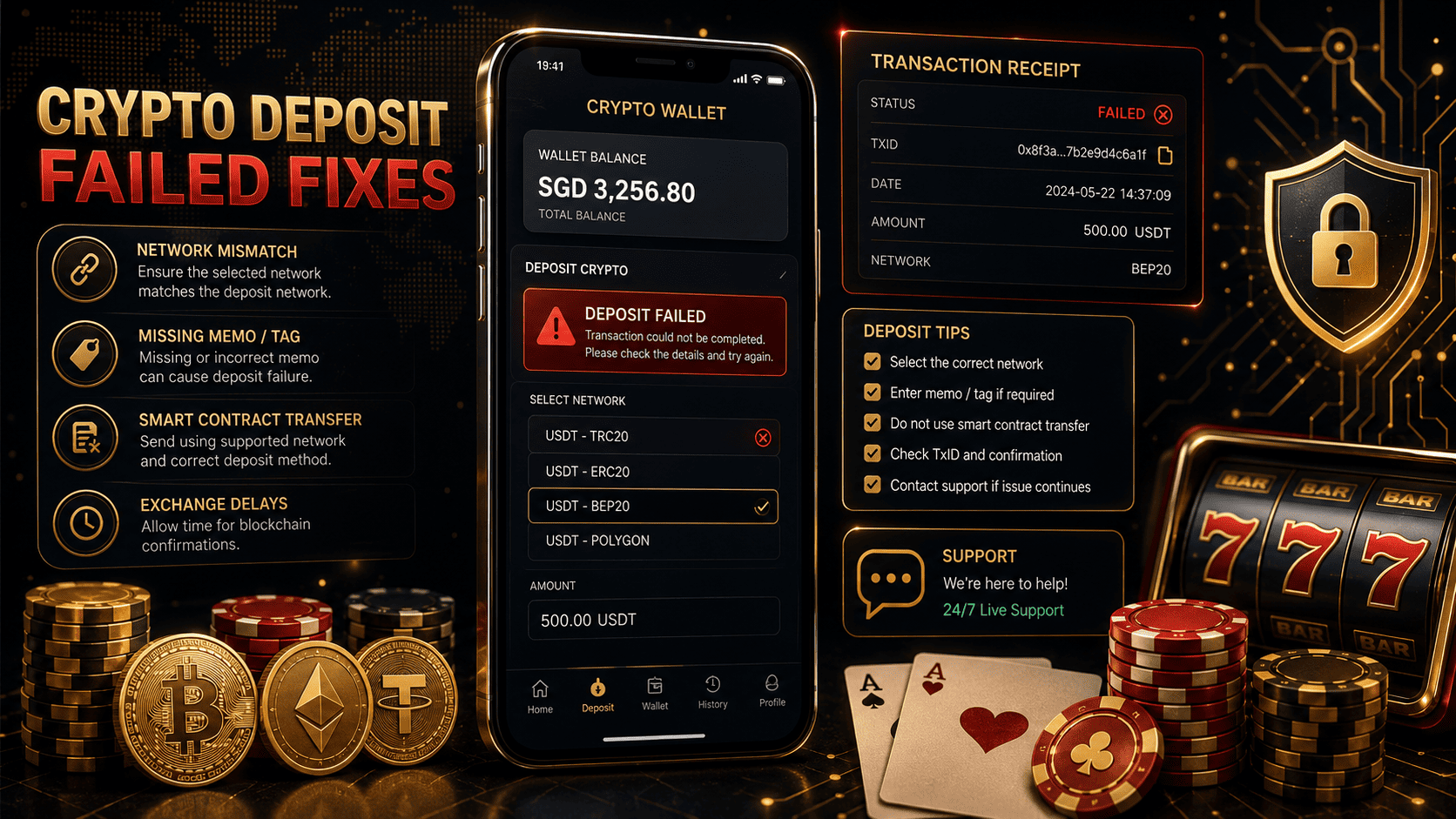
Gembet crypto deposit problems can feel stressful because blockchain transfers do not work like a PayNow deposit or a normal bank transfer. Once crypto leaves your wallet or exchange, the transaction moves through the selected blockchain network. If the wrong network, missing memo, low amount, or unsupported transfer type is used, the deposit may not credit automatically.
A failed or stuck Gembet crypto deposit does not always mean the funds are gone. In many cases, the transaction is completed on the blockchain but has not been matched to your Gembet account yet. The key is to identify the exact error, save the TxID, and contact support with the right details.
This guide explains the 4 most common reasons a Gembet crypto deposit may fail, how to avoid expensive mistakes, what to check before sending funds, and how crypto deposits can affect casino bonus tracking, GemBet slot play, and sports betting balance updates.
Why a Gembet Crypto Deposit Can Fail
A Gembet crypto deposit can fail when the blockchain transaction does not match the deposit request created on the platform. Crypto payments depend on exact details. The coin, network, address, memo, amount, and transfer type must all match the instructions shown on the deposit page.
Common causes include:
- Sending crypto through the wrong blockchain network
- Forgetting a destination tag or memo
- Using a smart contract wallet or complex transfer route
- Sending below the minimum deposit amount
- Exchange outflow delays
- Copying an old wallet address
- Closing the deposit page too early
- Expecting instant credit during network congestion
Before sending any crypto, always check the live deposit page and confirm every detail. Do not reuse old wallet addresses or saved screenshots unless the platform clearly confirms they are still valid.
Gembet Crypto Deposit Error 1: Network Mismatch
The most serious Gembet crypto deposit mistake is sending funds through the wrong network. This is common with USDT because it can exist on multiple blockchains, such as TRC-20, ERC-20, and BEP-20.
If the deposit page says TRC-20 but your wallet sends the transfer through ERC-20 or BEP-20, the platform may not detect the funds. The wallet address may look similar or valid, but the blockchain route does not match the network being monitored for your deposit request.
Simple Network Rule
The network selected in your wallet must exactly match the network selected on the Gembet deposit page.
Example:
Your crypto wallet: TRC-20
Gembet crypto deposit page: TRC-20
Result: Correct network match.
If the wallet network and deposit page network do not match, stop before sending the transfer. Cancel the transaction setup and start again with the correct network.
How to Prevent Network Mismatch
- Choose the coin first, such as USDT or another supported asset
- Select the exact blockchain network shown on the deposit page
- Check the network inside your wallet before confirming
- Review the final confirmation screen carefully
- Send a small test amount only if the platform supports it and the amount meets the minimum deposit
Network mismatch can be difficult to fix, so prevention is more important than recovery.
Gembet Crypto Deposit Error 2: Missing Destination Tag or Memo
Some crypto assets use more than a wallet address. Coins such as XRP and certain other networks may require a destination tag, memo, or payment ID. This extra code tells the system which user account should receive the deposit.
If the address is correct but the destination tag or memo is missing, the funds may still arrive at the receiving wallet, but the platform may not know which player account should be credited.
Why Tags and Memos Matter
Some platforms use shared wallet addresses for multiple users. The destination tag or memo acts like your account identifier. Without it, the deposit becomes harder to match automatically.
This is different from a PayNow deposit reference code, but the idea is similar. The payment may arrive, yet the system needs a unique identifier to connect it to your account.
How to Avoid Missing Memo Errors
- Check whether the coin requires a memo or destination tag
- Copy the memo exactly from the deposit page
- Paste it into the correct field in your wallet or exchange
- Do not place the memo in the wrong notes section
- Review the memo on the final confirmation screen
If you already sent funds without the required memo, copy the TxID and contact support. Provide the exact coin, amount, sending wallet, destination address, and transaction hash.
Gembet Crypto Deposit Error 3: Smart Contract Transfer Issues
A Gembet crypto deposit may also fail to credit automatically if the transfer comes from a smart contract wallet, multi-signature wallet, decentralized app, or advanced crypto tool. Some betting and casino payment systems are designed to detect standard wallet-to-wallet transfers, not complex contract-based transactions.
If the deposit is routed through a smart contract, the blockchain may show the transaction as successful, but the platform’s automated checker may not read it as a normal incoming deposit.
When Smart Contract Transfers Cause Problems
- The wallet sends funds through a contract instead of a direct transfer
- The transaction includes multiple internal steps
- The receiving system does not monitor internal transfers
- The deposit tracker fails to trigger an automatic credit
For smoother processing, use a standard personal wallet or exchange withdrawal method supported by the platform. Avoid complicated crypto routing when making a casino deposit.
Gembet Crypto Deposit Error 4: Exchange Delay or Minimum Amount Issue
Sometimes a Gembet crypto deposit has not failed. It may simply be delayed. Exchanges can hold withdrawals for review, batch transfers during busy periods, or delay outflows during network congestion.
Before assuming the deposit failed, check whether the exchange has actually sent the funds. A pending withdrawal inside your exchange is not the same as a completed blockchain transfer.
Check the Transaction Status
- If the exchange says pending, wait for the withdrawal to be released
- If the exchange says completed, copy the TxID
- Paste the TxID into the correct blockchain explorer
- Confirm the receiving address, amount, and network
- Check whether the transaction has enough confirmations
Minimum deposit amounts can also create problems. If the required minimum is not met after fees or price movement, the deposit may not trigger an automatic credit. Always send enough to cover the minimum amount after network fees.
Gembet Crypto Deposit Checklist Before Sending Funds
Use this checklist before making a Gembet crypto deposit. A quick review can prevent most failed deposit issues.
- Confirm the coin is supported
- Confirm the blockchain network matches exactly
- Copy the current wallet address from the live deposit page
- Add the memo, destination tag, or payment ID if required
- Check the minimum deposit amount
- Allow enough extra value for network fees
- Use a standard transfer method when possible
- Review the final wallet or exchange confirmation screen
- Save the TxID after sending
This checklist is useful for crypto deposits, sports betting balance funding, GemBet slot sessions, and casino bonus claims that depend on a successful deposit.
Crypto Deposit Failed vs. Crypto Deposit Delayed
A failed Gembet crypto deposit and a delayed crypto deposit are not always the same issue. The table below can help you understand what may be happening.
| Status | Possible Cause | Best Action |
| Exchange withdrawal pending | Exchange has not sent the funds yet | Wait for the exchange to release the transfer |
| Blockchain completed, wallet not credited | Deposit may need manual matching | Send the TxID to support |
| Wrong network used | Network mismatch | Contact support, but recovery may be limited |
| Missing memo or tag | Funds arrived without account identifier | Provide TxID, amount, address, and memo details if available |
| Below minimum amount | Deposit did not meet platform threshold | Contact support before sending more funds |
| Bonus not showing | Deposit not linked to casino bonus tracking | Do not play yet and ask support to review the deposit |
What to Do If Your Gembet Crypto Deposit Is Stuck
If your Gembet crypto deposit shows as completed on the blockchain but your casino wallet has not updated, collect the right proof before contacting support.
Step 1: Copy the TxID
The TxID, also called a transaction hash, is your blockchain receipt. It is a long string of letters and numbers that allows support to trace the payment.
Do not send only a screenshot of the TxID if support asks for the actual text. Copy and paste the full transaction hash so it can be checked accurately.
Step 2: Check the Blockchain Explorer
Use the correct blockchain explorer for the network you selected. For example, TRC-20 transfers should be checked on a Tron explorer, while ERC-20 transfers should be checked on an Ethereum explorer.
Confirm the receiving address, amount, network, and completion status.
Step 3: Contact Support With Complete Details
Send one clear message with all key information. A complete message helps the payment team review the case faster.
Include:
- Registered username or email
- Coin sent
- Blockchain network used
- Deposit amount
- Destination address
- Memo or tag, if required
- TxID or transaction hash
- Time and date of transfer
- Screenshot of the deposit page and wallet receipt
How a Failed Crypto Deposit Can Affect a Casino Bonus
If your deposit was connected to a casino bonus, do not play until the deposit is credited and the bonus status is confirmed. Bonus tracking may depend on the exact deposit amount, time, payment method, and promotion terms.
If a crypto deposit is manually credited later, the casino bonus may need a separate review. Support may need to confirm whether the deposit still qualifies for the offer.
This matters for GemBet slot bonuses, crypto slot matches, reload promos, and sports betting offers linked to deposit activity.
Bonus Tracking Tips
- Save the bonus page before depositing
- Confirm crypto deposits qualify for the promotion
- Check the minimum deposit requirement
- Do not place bets until the bonus appears
- Ask support to review the deposit and bonus together
PayNow Deposit vs. Gembet Crypto Deposit
A PayNow deposit and a Gembet crypto deposit can both fund an account, but the recovery process is different. PayNow usually depends on bank receipts, reference codes, and SGD transfer details. Crypto depends on blockchain network, wallet address, memo, TxID, and confirmations.
| Deposit Type | Main Risk | Proof Needed |
| PayNow deposit | Wrong reference code or amount | Bank receipt and transaction reference |
| Gembet crypto deposit | Wrong network, missing memo, or low amount | TxID, wallet address, network, and amount |
| Casino bonus deposit | Bonus tracking not attached | Promotion screenshot and deposit proof |
Understanding the difference helps users send the right proof to support instead of delaying the review with incomplete information.
Security Tips Before Making a Crypto Deposit
Crypto transfers require extra caution because transactions cannot usually be reversed. Before sending funds, check the platform page, wallet details, and network one more time.
- Do not use old deposit screenshots
- Do not reuse old wallet addresses unless confirmed valid
- Do not send from unsupported smart contract wallets
- Do not rush because a casino bonus is expiring
- Do not send below the minimum amount
- Do not ignore memo or tag fields
- Do not switch networks after copying an address
A careful deposit process protects your funds and reduces the chance of delayed casino games, GemBet slot play, or sports betting access.
Responsible Crypto Deposit Reminder
Crypto deposits can feel fast and convenient, but users should still manage their budget carefully. Decide your deposit amount before opening the wallet and avoid sending more funds just because one transaction is delayed.
If a Gembet crypto deposit is stuck, stop and investigate. Check the exchange, confirm the blockchain status, copy the TxID, and contact support before making another transfer.
Best Way to Fix a Failed Gembet Crypto Deposit
The best way to fix a failed Gembet crypto deposit is to identify whether the issue came from a network mismatch, missing memo, smart contract transfer, exchange delay, or minimum amount problem. Then collect the TxID and send support the exact transaction details.
For future deposits, match the network exactly, copy the current wallet address, include any required memo or tag, meet the minimum amount, and save the transaction hash. These steps help your Gembet crypto deposit credit faster and reduce problems with casino bonus tracking, sports betting balance updates, and GemBet slot access.
Experience the real deal with SG's top Live Dealers. Play Baccarat, Roulette & more.

